
Modern vehicles need interfaces that do more than look good on a screen. Infotainment systems, digital clusters, navigation, media, climate controls, warning indicators, and vehicle settings must work together in real time, across embedded Linux and MCU-based platforms.
That makes automotive HMI development a serious engineering challenge. The interface must be visually intuitive, fast to respond, stable on hardware, and synchronized with live vehicle data. This is where Qt/QML-based HMI development becomes valuable.
Because in the next generation of vehicles, the best HMI will not be the one with the most polished graphics. It will be the one that performs reliably when the vehicle is actually running.
Why Automotive HMI Development Is Getting More Complex
Automotive HMI has moved beyond basic display screens. Earlier, a cluster showed speed and warnings, infotainment handled media, and climate controls often remained physical. Today, these boundaries are fading.
Modern vehicles are moving toward integrated digital cockpits where multiple systems must work as one connected experience: infotainment, instrument clusters, navigation, media, climate control, vehicle settings, personalization, warning indicators, and vehicle status displays.
For the driver, these are not separate software modules. They are one cockpit experience.
This creates a deeper engineering challenge. The HMI must process live vehicle signals, respond to user inputs, manage multiple states, show priority alerts, and perform consistently on embedded hardware.
A warning indicator cannot lag because an animation is running. A speed value cannot update inconsistently across screens. A climate control interaction cannot feel slow when the driver needs a quick adjustment. That is why automotive HMI development now sits at the intersection of UI architecture, embedded software, real-time data integration, rendering performance, and hardware validation.
Where Qt/QML Fits in Embedded Automotive HMI
Qt/QML gives automotive teams a practical way to build responsive, state-driven, and visually rich interfaces while keeping the UI layer separate from backend logic.
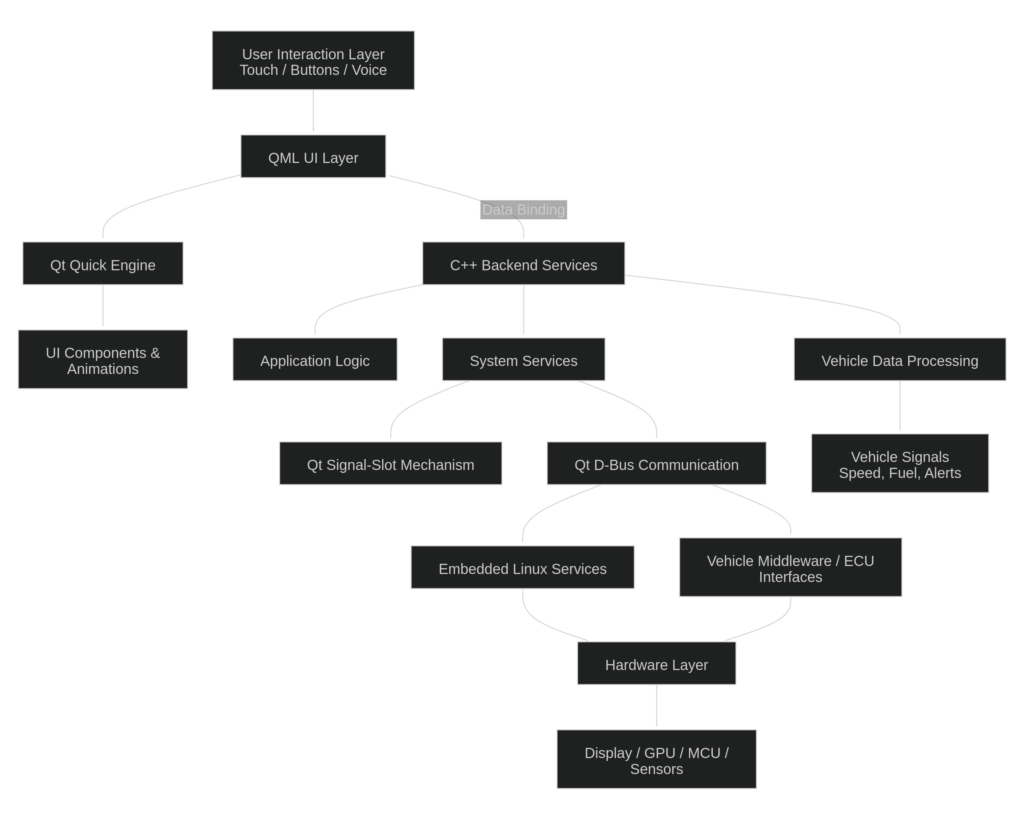
In a typical embedded HMI architecture:
- QML manages the interface layer
- Qt Quick supports dynamic UI behavior, animations, and reusable components
- Modern C++ handles backend services, application logic, data processing, and performance-critical functions
- Qt signal-slot mechanisms support communication between application objects
- Qt D-Bus can support service communication in Linux-based environments
- Qt for MCUs and Qt Quick Ultralite support UI development for resource-constrained platforms
This separation is important because cockpit systems are rarely static. They must respond to vehicle signals, user actions, service updates, system settings, localization, and hardware-specific behavior.
The real value of Qt/QML is not just faster interface development. It is the ability to build HMI architecture that is modular, reusable, scalable, and connected to real-time embedded systems.
The diagram below illustrates how these layers connect in a typical Qt/QML-based automotive HMI application:
From Infotainment to Instrument Clusters: Key HMI Use Cases
Qt/QML-based HMI development supports a wide range of cockpit applications, each with different performance expectations.
Infotainment systems need media controls, navigation interfaces, phone connectivity, system settings, notifications, and personalization modules. Instrument clusters need speed display, fuel level, warning indicators, ride data, drive mode, and system status. Other HMI modules include climate control, vehicle status screens, navigation and media split-screen layouts, driver alerts, and system preferences.
The challenge is that each screen behaves differently. Infotainment can support richer visuals and deeper interactions. A digital cluster needs fast updates, high reliability, and clear visual hierarchy. Climate HMI needs quick access and minimal driver distraction.
This is where reusable QML components make a difference. Gauges, cards, warning indicators, sliders, media controls, and status modules can be built once and adapted across screen sizes, orientations, and vehicle variants.
At Verolt, our embedded HMI capability spans infotainment interfaces, instrument clusters, system settings, personalization modules, navigation and media screens, climate HMI, vehicle status displays, warning indicators, and performance-critical data visualization across MCU and embedded Linux platforms.
Real-Time Vehicle Data Integration in HMI Systems
A modern automotive HMI is only as strong as the data pipeline behind it. The interface must reflect vehicle signals such as speed, fuel level, warning indicators, navigation updates, media state, ride data, and system information — with low latency and high consistency.
The system must also decide how data flows, how often the UI updates, how warnings are prioritized, and how different modules stay synchronized.
A speedometer needs smooth, continuous updates. A fuel warning needs clear visibility and correct timing. Media updates can be lower priority than safety-related alerts. Navigation must stay responsive without disturbing critical vehicle signals.
Qt/QML-based systems support this through structured backend services, signal-slot communication, Qt D-Bus integration, and controlled data binding between C++ services and QML components.
But implementation discipline matters. Poorly managed bindings, excessive UI refreshes, or blocking backend operations can affect responsiveness. The goal is not just to display vehicle data. It is to display it accurately, predictably, and without compromising the rest of the interface.
Embedded Linux and MCU Platforms Need Different HMI Thinking
Not every embedded platform behaves the same way. Embedded Linux systems and MCU-based platforms have very different constraints.
Embedded Linux platforms are suited for advanced infotainment systems, multimedia applications, navigation, connectivity, service-based architectures, and larger, richer display environments.
MCU-based platforms require more discipline around memory usage, processing load, graphics capability, runtime resources, asset size, animation complexity, screen transitions, and rendering behavior.
Qt for MCUs and Qt Quick Ultralite help teams build graphical interfaces for microcontroller-based systems. But the HMI still needs to be designed for the hardware.
An interface that works well on a desktop or high-performance Linux environment may not perform the same way on an MCU-based cluster. The best embedded HMI projects consider the target platform early. Architecture, component design, rendering strategy, data refresh behavior, and validation plans must reflect hardware realities from the beginning.
Why Performance Optimization Matters in Automotive HMI
In automotive HMI, performance is not just a technical metric. It directly affects usability and trust. A delayed screen transition, unstable animation, slow climate response, or late warning update can make the cockpit feel unreliable.
Performance optimization in Qt/QML development usually focuses on:
- Reducing unnecessary QML bindings
- Optimizing UI assets
- Avoiding heavy component nesting
- Keeping animations lightweight
- Preventing backend services from blocking the UI thread
- Managing memory carefully
- Prioritizing critical data updates
- Maintaining stable frame rates
This is especially important on constrained embedded platforms. Stable rendering is not achieved through visual design alone. It comes from disciplined implementation.
At Verolt, our HMI development approach includes efficient QML design, Qt Quick and Qt Quick Ultralite usage, reduced bindings, asset optimization, memory management, low-latency data processing, and optimized data flow from backend services to QML-based UI across MCU and embedded Linux platforms.
Building Scalable and Reusable QML Components
Automotive programs rarely involve one screen for one vehicle. The same HMI foundation may need to support multiple trims, regions, screen sizes, orientations, hardware configurations, and vehicle variants.
A strong component library can include gauges, warning indicators, menu blocks, list views, settings controls, media widgets, navigation modules, status cards, and climate control elements. These components can be reused across screens and adapted through properties, themes, layouts, and data models.
The advantage is not only speed. Reusability improves consistency, reduces regression risk, and helps teams scale across multiple programs.
But reusable components need balance. If they are too rigid, they fail across variants. If they are too generic, they become difficult to maintain. Good QML architecture gives teams flexibility without losing platform-specific precision.
Validation Beyond the Desktop Environment
Desktop testing is useful during early HMI development, but it is not enough for production-ready automotive systems. The real test is how the interface behaves on target embedded hardware.
An HMI can look smooth on a development machine and still show issues such as frame drops, memory pressure, touch delays, rendering inconsistencies, signal latency, synchronization gaps, and slow screen transitions.
Validation should also test edge cases: What happens when a backend service is delayed? What if a signal is unavailable? Does the UI show a safe fallback? Are warning indicators prioritized correctly? Does the interface remain stable during rapid state changes?
At Verolt, validation includes real embedded hardware platforms, including MCU-based and embedded Linux systems. Simulation environments and test setups are also used to evaluate responsiveness, rendering performance, latency, and real-time behavior before deployment.
Driver-Friendly UI/UX in Automotive HMI Development
A strong automotive HMI is not the one that shows the most information. It is the one that shows the right information with the least cognitive effort.
Driver-friendly UI/UX needs glanceable layouts, clear visual hierarchy, predictable interactions, distraction-minimized screens, smooth but restrained motion, easy access to essential controls, clear warning visibility, and readable navigation and vehicle status data.
This requires careful design judgment. Not every feature should be one tap away if it creates clutter. Not every interaction needs animation. Not every data point deserves the same visual priority.
Automotive UI design must be shaped by driving context. What looks attractive in a design review may not be effective inside a moving vehicle. That is why HMI development must combine UI design, usability thinking, safety-conscious interaction design, and embedded performance validation.
Common Engineering Challenges in Qt/QML HMI Projects
Qt/QML gives teams a strong development foundation, but successful delivery depends on how well the engineering challenges are handled.
Common challenges include:
- Backend integration across vehicle signals, media, navigation, warnings, and settings
- Data synchronization across multiple screens
- Rendering delays caused by complex layouts or excessive bindings
- Memory limits on constrained platforms
- UI scalability across different screen sizes and vehicle variants
- Hardware-specific behavior that appears late in testing
- Validation gaps between desktop simulation and target hardware
The strongest HMI programs address these concerns early. They treat data flow, UI architecture, platform constraints, performance, and validation as one connected engineering problem.
Why Verolt? Embedded HMI Development Needs UI Intelligence and Platform Discipline
At Verolt, we support embedded automotive HMI development across Qt/QML, Qt for MCUs, Modern C++, Qt D-Bus, Yocto-based embedded Linux environments, and real-time vehicle data integration.
Our work spans infotainment systems, instrument clusters, system settings, personalization modules, navigation and media screens, climate HMI, vehicle status displays, warning indicators, and performance-critical data visualization.
For us, automotive HMI development is not just about creating screens. It is about building embedded interfaces that are intuitive, responsive to live vehicle data, stable on target hardware, and optimized for platform constraints.
By combining reusable QML components, backend service integration, low-latency data flow, rendering optimization, hardware-level validation, and Agile execution, we help automotive teams move from HMI concepts to production-ready embedded applications with greater confidence
The Future of Automotive HMI Is Real-Time, Scalable, and Embedded-Ready
The future of automotive HMI will not be defined only by larger displays, sharper graphics, or more features. It will be defined by how well the interface integrates with the vehicle.
Next-generation HMIs must respond to real-time data, perform reliably on embedded hardware, adapt across platforms, and help drivers interact with the vehicle more intuitively. This requires more than UI design. It requires architecture, backend integration, validation, performance optimization, and production-aware development.
Qt/QML-based HMI development gives automotive teams a strong foundation for this shift. It enables reusable components, dynamic interfaces, embedded deployment, and real-time data-driven behavior. But the quality of the final HMI depends on engineering discipline.
Because the automotive cockpit is no longer just a screen environment. It is a real-time embedded system. And the interfaces that succeed will be the ones that are not only beautifully designed, but also built to perform when every signal, screen, and interaction matters.


